Nesting
Nesting automates the process of laying out your parts in a way that uses less material. LightBurn 2.2 offers three options for nesting.
| True Nest | Quick Nest | SVGNest (External Tool) | |
|---|---|---|---|
| LightBurn release | LightBurn 2.2 Pro | LightBurn 2.1 | LightBurn 1.1 |
| Nests based on true shape of objects | ✅ | ❌ | ✅ |
| Fully integrated in LightBurn | ✅ | ✅ | ❌ |
| Works locally, internet not required | ✅ | ✅ | ❌ |
| Read more | True Nest | Quick Nest | SVGNest (External) |
Nesting Comparison
The top row in the image below shows the results of LightBurn's True Nest, and the bottom row shows the results of Quick Nest.
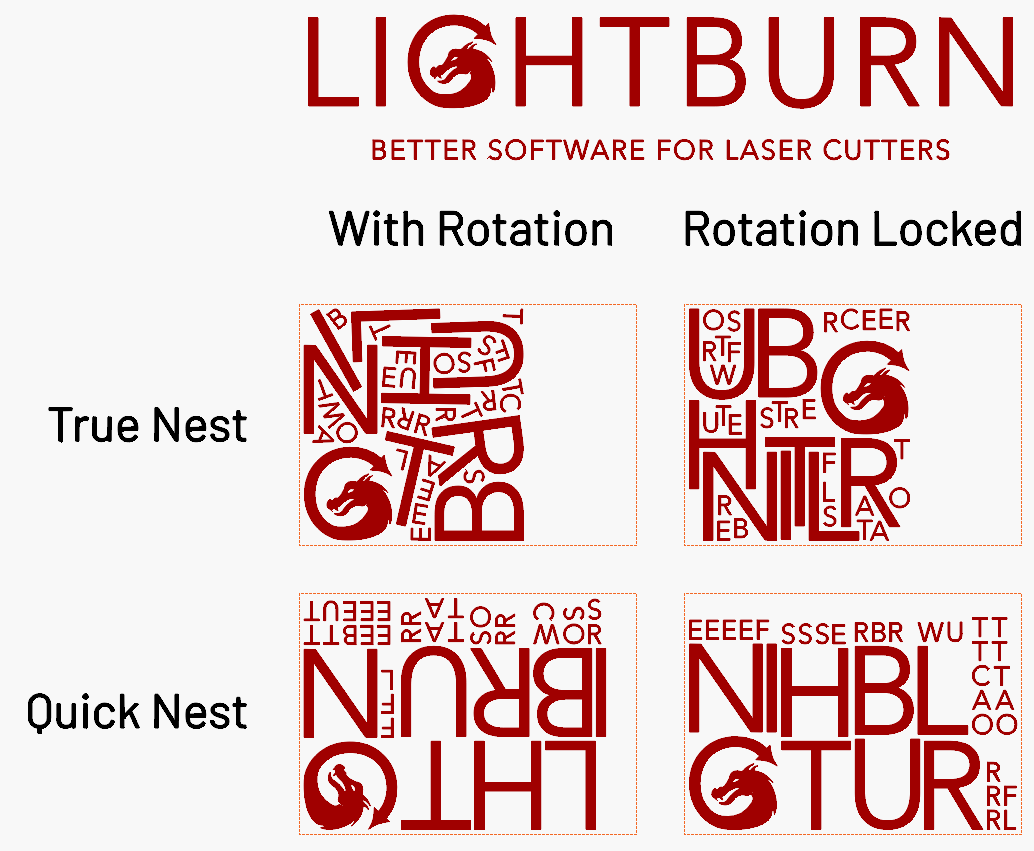
True Nest can pack your shapes more densely than Quick Nest, although the difference between the two varies depending on the objects you're nesting. If the objects are all close to rectangles to begin with, the difference between the bounding box and the actual shape isn't going to matter much. However, with more irregular shapes, the difference can be significant. In the example above, True Nest saves a lot of material by interlocking the larger letters and squeezing smaller letters into the gaps.