Classroom Safety
Eye and Skin Damage
Lasers can cause eye and skin damage. The best way to avoid this is to use a properly enclosed laser cutter that's categorized as Class 1, which includes most commercially sold CO2 lasers and some enclosed diode lasers. Class 4 lasers, such as open-framed diode laser engravers, require significant safety controls to be used safely.
Laser Classification
What About Class 2 and 3?
Because of the power output needed to engrave and cut, laser cutters are generally going to be either Class 1 (for enclosed and interlocked systems) or Class 4 (for the bare laser and for cutters without the built-in protections of laser cutters categorized as Class 1). If you're curious to know more about other classes, we have links below on the laser hazard classification system.
When it comes to laser safety, lasers are categorized into Class 1 through Class 4 by the level and type of hazard they present.
Class 1 lasers are not considered hazardous and don't require additional safety controls. These are either very low-power lasers, or systems that are fully enclosed with safety interlocks that prevent exposure to the laser beam. Enclosed CO2 laser cutters are typically Class 1 systems because of their interlocked enclosures.
Class 4 lasers are the most dangerous and require strict safety controls to prevent harm. These are high-powered lasers that can cause eye and skin damage from a direct beam, and possibly even from a reflection. These lasers require significant safety precautions. Lasers with an output above 500 mW (0.5W) are automatically Class 4, although they can be part of a Class 1 system as described above. Open-framed diode laser cutters, and even some enclosed ones, are Class 4 lasers, as are the actual lasers in Class 1 systems.
Resources on laser hazard classification
Some useful sources of information.
Classroom Considerations
In a classroom or other shared workshop space, it's particularly important to use Class 1 laser cutters. The more people you have present in the room, the harder it is to maintain appropriate safety controls for a Class 4 laser. Class 4 lasers in shared spaces should be managed very carefully and in consultation with a laser safety expert.
Laser Safety Glasses
While properly rated laser safety glassses and goggles are available and highly effective as part of your safety controls for a Class 4 laser, they're not an ideal solution for classrooms.
- The glasses that come with inexpensive diode laser cutters are sometimes tinted glasses rated for impact resistance, not properly rated for laser usage. Properly rated, trustworthy laser safety glasses are expensive and a full class set is probably going to be more expensive than the laser itself.
- If you've ever taught in a shop setting that requires wearing safety glasses, you know how hard it is to keep students from taking them off. It gets even harder when the glasses are extremely dark and make it hard to see.
Hazardous Fumes
When you use a laser cutter, you're burning material away, which produces unpleasant and potentially harmful fumes. The fumes vary based on the materials you're using. Some materials produce unpleasant smells or even toxic and corrosive fumes.
- Be careful with your material choices. Lasers are versatile and can cut a wide range of materials, but not all of them are safe to cut. We've listed a few common examples below, but can't list every hazardous material. If you're unsure whether it's safe to burn a material, a good starting point is to look for an SDS (or your country's local equivalent) and look for firefighting precautions and decomposition products/conditions.
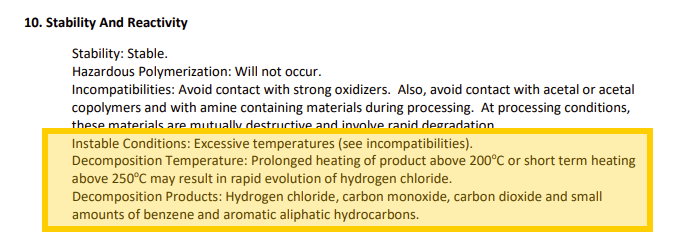
- PVC is a common material that you should never laser — burning PVC or significantly heating it releases hydrogen chloride gas, which is corrosive both to your laser and your lungs. Never laser PVC or any other plastic that contains chlorine.
- Plywood can be made with a variety of glues, some of which release noxious fumes when burned, so the safest choice is to use plywood specifically intended for lasering.
- It's important to vent the fumes outside or use a properly rated and maintained filtration system to clean the air if venting outside isn't an option.
Classroom Considerations
- In a classroom or other shared space, it's easy to mix up laserable and non-laserable materials, especially in scrap piles. Particularly for scraps or unlabeled materials, make sure that you know exactly what a material is before lasering.
- It's critical to make sure everyone with access to the laser understands what can and can't be cut, or checks with someone who does.
What not to do
Some of my recommendations come from lessons I've learned the hard way. Years ago, I told a student to test a complex design in cardboard before cutting it out of wood, expecting him to use a piece of cardboard from the supply I kept by the laser. Instead, he used a greasy pizza box left over from the robotics meeting the night before.
After putting out that fire, I'd never been so awake in first period before. That's also when I instituted my rule that all students had to show me their material before cutting.
Speaking of which...
Fires
Fires are the most dramatic and visible hazard of working with lasers, but they're also quite manageable as long as you're prepared and always supervise your laser. It doesn't matter if you've run the same job 100 times without an issue, there's always a first time.
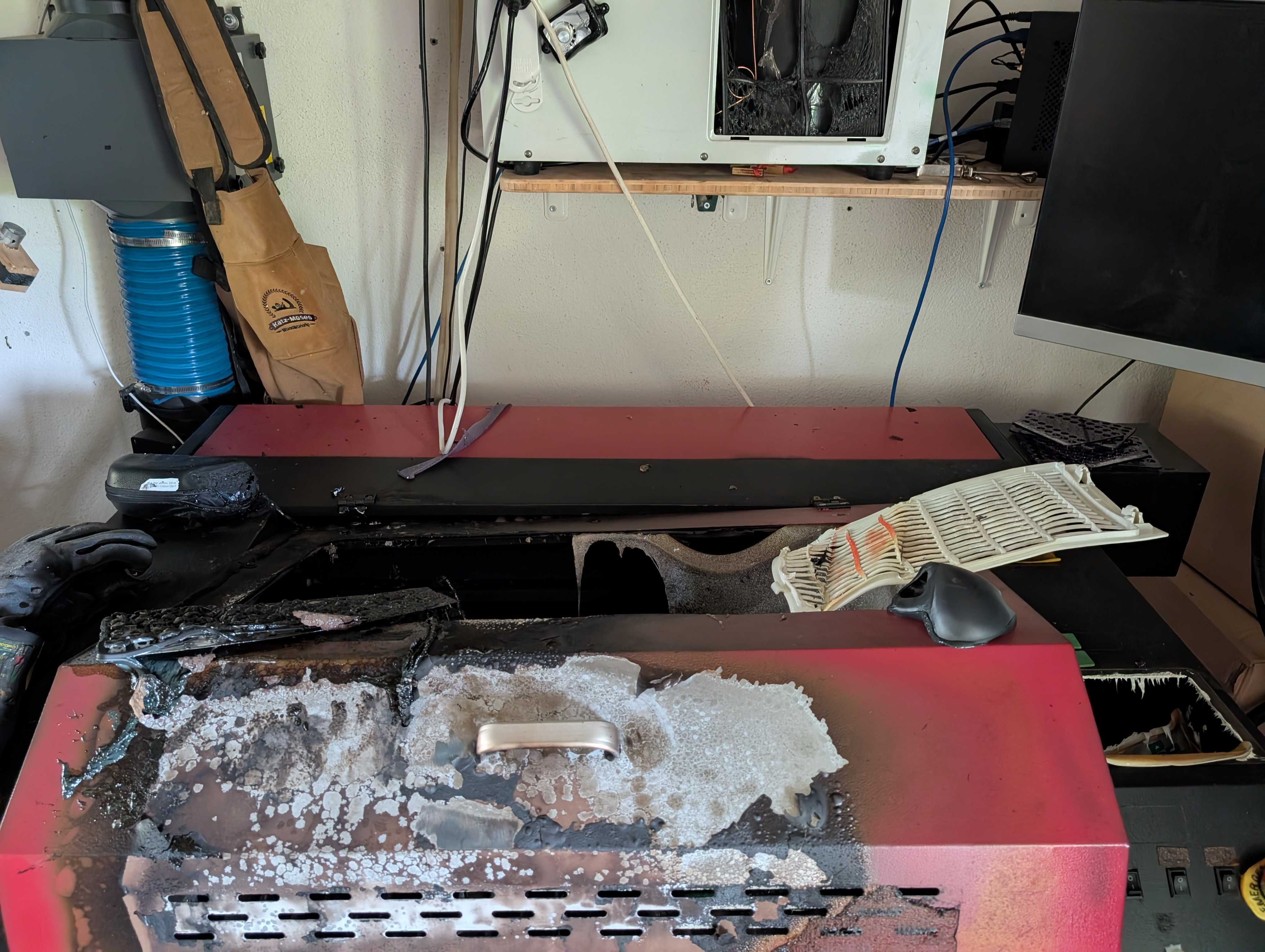
Never run your laser unsupervised!
To reduce your risk:
- Have spray bottles of water and appropriate fire extinguishers on hand near the laser, and make sure anyone using the laser is trained to use them.
- Be careful with materials that may have voids (hidden air pockets), because the air pockets can flare up into a fire when you hit them with the laser.
- Never run the laser unattended.
Classroom Considerations
- Check with whoever is in charge of your facilities on purchasing and maintaining fire extinguishers.
- Make sure your students are trained on fire safety and know what to do, but always supervise the laser along with the students while it's running. Don't count on students being able and ready to respond to a fire.
Conclusion
While laser cutters do come with potential risks like any tool, those risks can be easily managed by choosing an appropriate machine, avoiding unsafe materials, supervising your laser properly, and being prepared to extinguish a potential fire.
If you've already got a laser, why not try making a project. And if not, consider taking a look at our Hardware Compatibility Matrix for LightBurn-compatible lasers.