🔥 What's New
LightBurn 2.2 is out now! We've got a lot to say about all the new features and improved hardware support in 2.2, so be sure to read to the bottom for full details.
Download LightBurn 2.2 Add a year of updates to your license
First, here are the highlights:
- New design, layout, and workflow efficiency tools: True Nest (Pro-only), Center Line Trace, and Multi Page Projects
- Camera Print and Cut (Labs), a new option that uses a head-mounted camera to automatically identify target markers and align laser output
- We now support the ACCELaser HD1 Series, Bambu Lab's new R1 laser, and a wide range of Epilog Laser hardware. We've improved or added support for several xTool machines. Epilog and xTool support are both "Labs" features
- My Laser Tools, an online project generator and design platform, is now available in the Web Tools Menu
- REST API (Labs) added, providing a way to communicate and integrate between LightBurn and other applications
True Nest (Pro-Only)
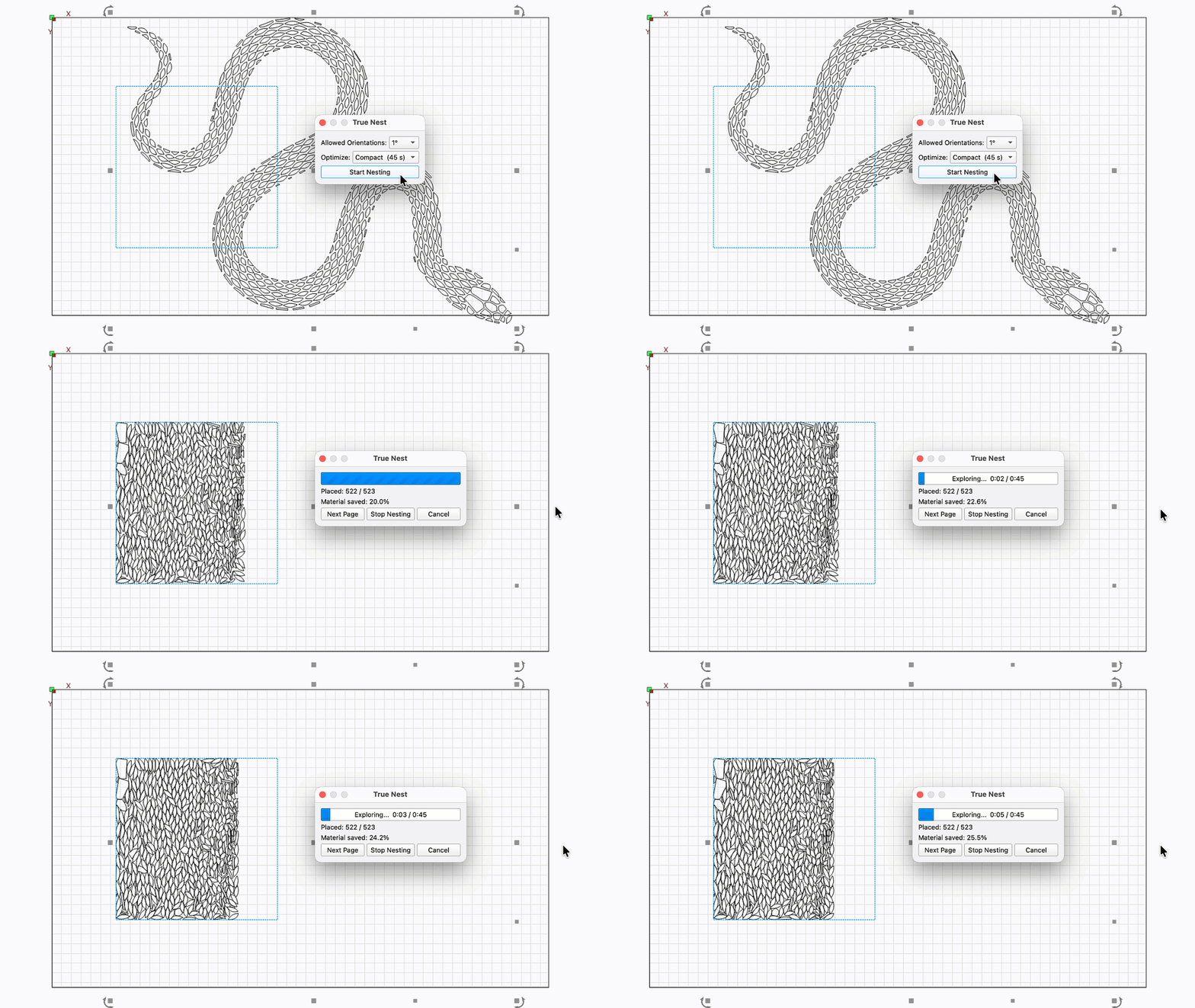
It's here — a full nesting solution, built into LightBurn. In 2.1 we added Quick Nest, a blazing-fast option that nests objects based on their bounding boxes.
Now we've upped our game with True Nest, which nests objects based on their actual contours. You can choose from four Optimization levels that determine how long it spends generating the best layout, but all of them are shockingly fast — especially compared to doing it by hand.
An important note: True Nest is the first LightBurn design/layout feature that is limited to Pro licenses only. We made that choice because premium features like True Nest are really hard to write, and the only way we can develop features like this and still keep the lights on is to charge a bit more. We also recognize that not all users need it, so rather than raise prices across the board, we chose to make it Pro-only as the fairest option.
If you're a Core user, upgrade to Pro if you think True Nest will help you work faster and save money on material. It shouldn't take more than a few sheets-worth of savings to pay for itself.
Not sure yet? Head to Help → License Management and click the Trial Pro button for two weeks of Pro access.
Center Line Trace
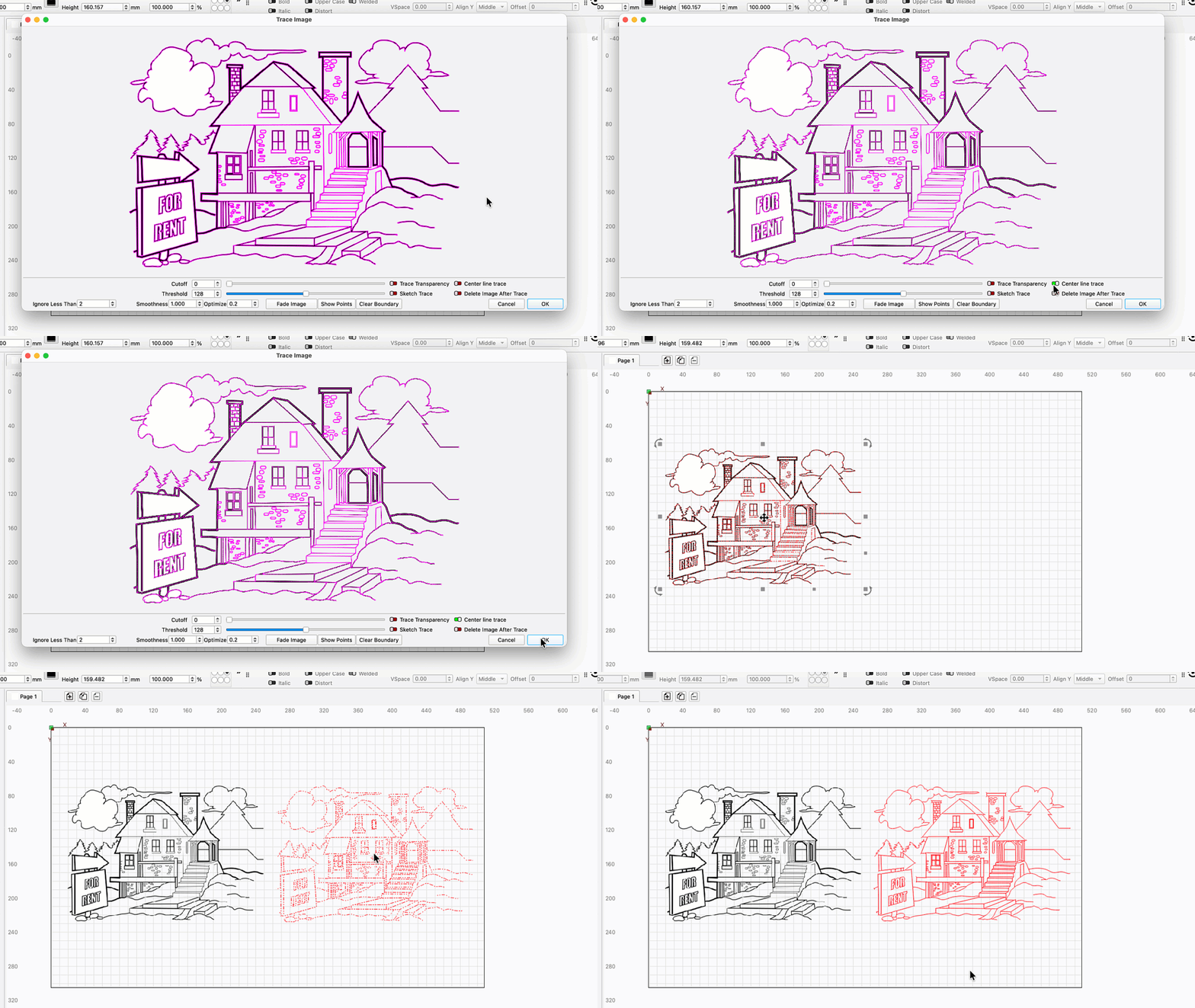
We've added a new option to the Trace Image tool — Center Line Trace. Unlike a standard trace, this option produces lines running along the medial axis of shapes identified in your image. It's a great option for tracing logos, sketches, and text.
While "medial axis" is sort of a fancy way of saying "center line", it also carries an important distinction — this is cold, hard math, and the result might not be quite what you think it should be by eyeball. Especially if you feed in a low resolution image, you'll get a result with lots of offshoots where the pixel-to-path equation says the medial axis is. Stick to high-res images with clear outlines for best results.
Camera Print and Cut (Labs)
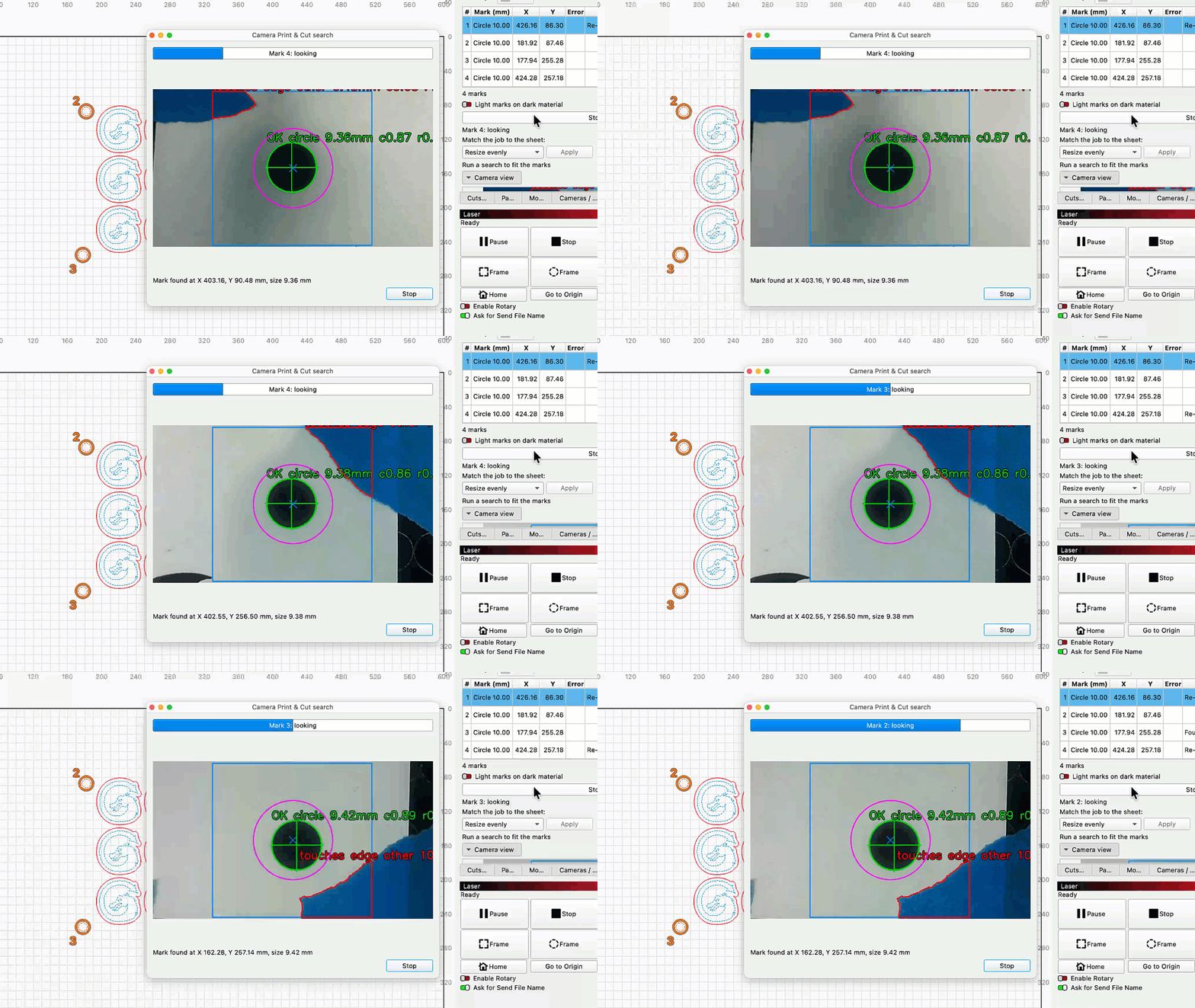
Camera Print and Cut uses a head-mounted camera to identify registration marks on your material, then aligns your output to cut around pre-printed graphics.
Manually jog your laser over the first one and hit go. LightBurn will automatically jog the laser to identify the rest of your targets, then position and orient output to match.
If your laser didn't come with a head-mounted camera, don't be discouraged — with zip ties and an intrepid spirit you can strap an endoscope onto just about any laser on the market and make use of this tool.
Our initial implementation is extremely accurate, but we're marking this as a "Labs" feature nonetheless. It was a late arrival to 2.2 (we couldn't wait, and we didn't want you to wait), so there is some potential for bugs or unexpected results. As with all Labs features, use with care — and cheap materials at first.
Multi Page Projects
We see you out there with your graphics all spread around the margins of your Workspace. Please stop doing that, it makes us nervous. We've seen the devastation when a file like that gets lost or corrupted.
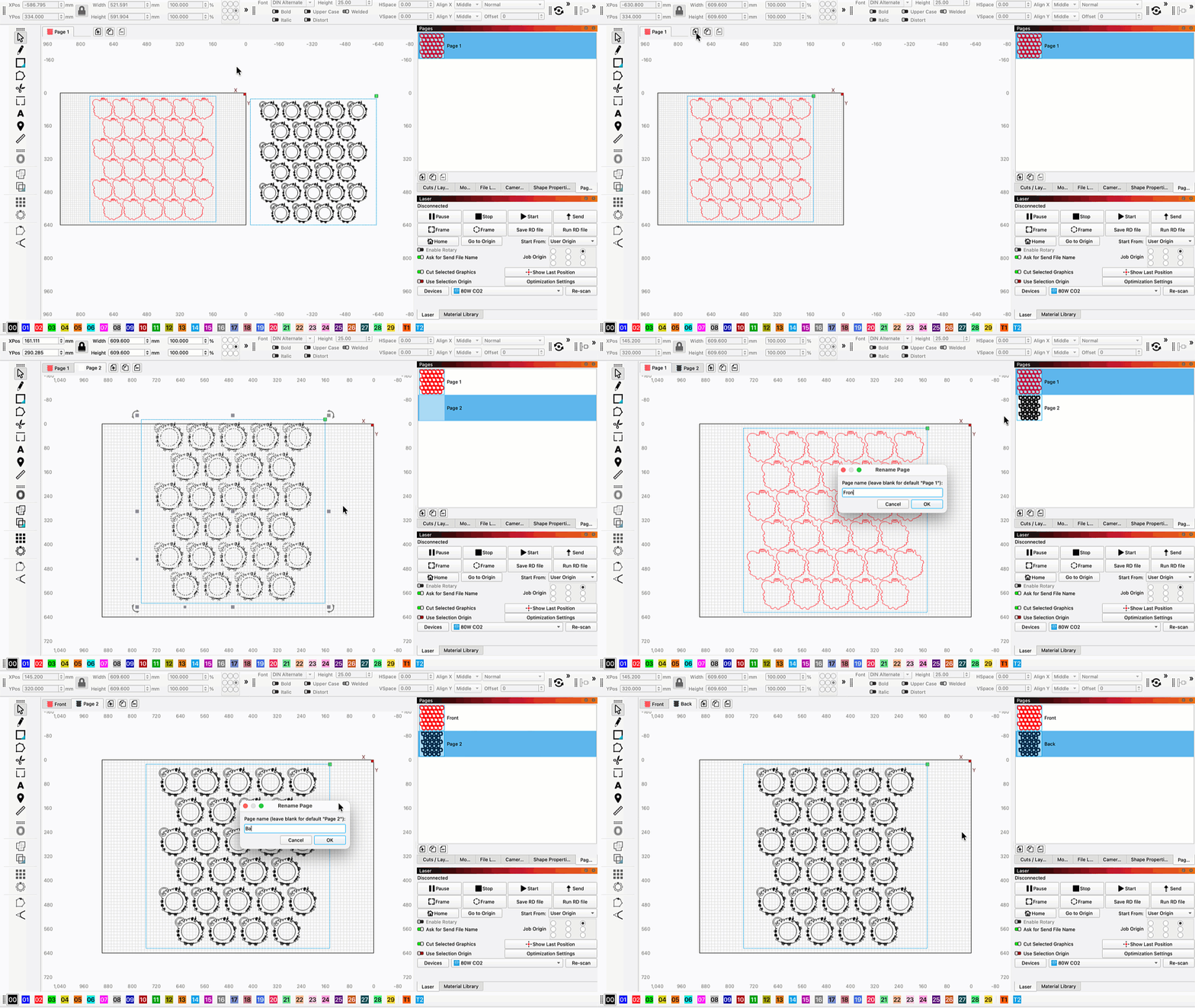
With Multi Page Projects, you can get more organized. It's still not a great idea to load up a project with tons of unrelated graphics in different tabs, but Pages let you sort related graphics into separate spaces.
You can Add, Remove, Copy, and Rename Pages from the interface at the top of Workspace, or in the new Pages Window.
3D Model Import
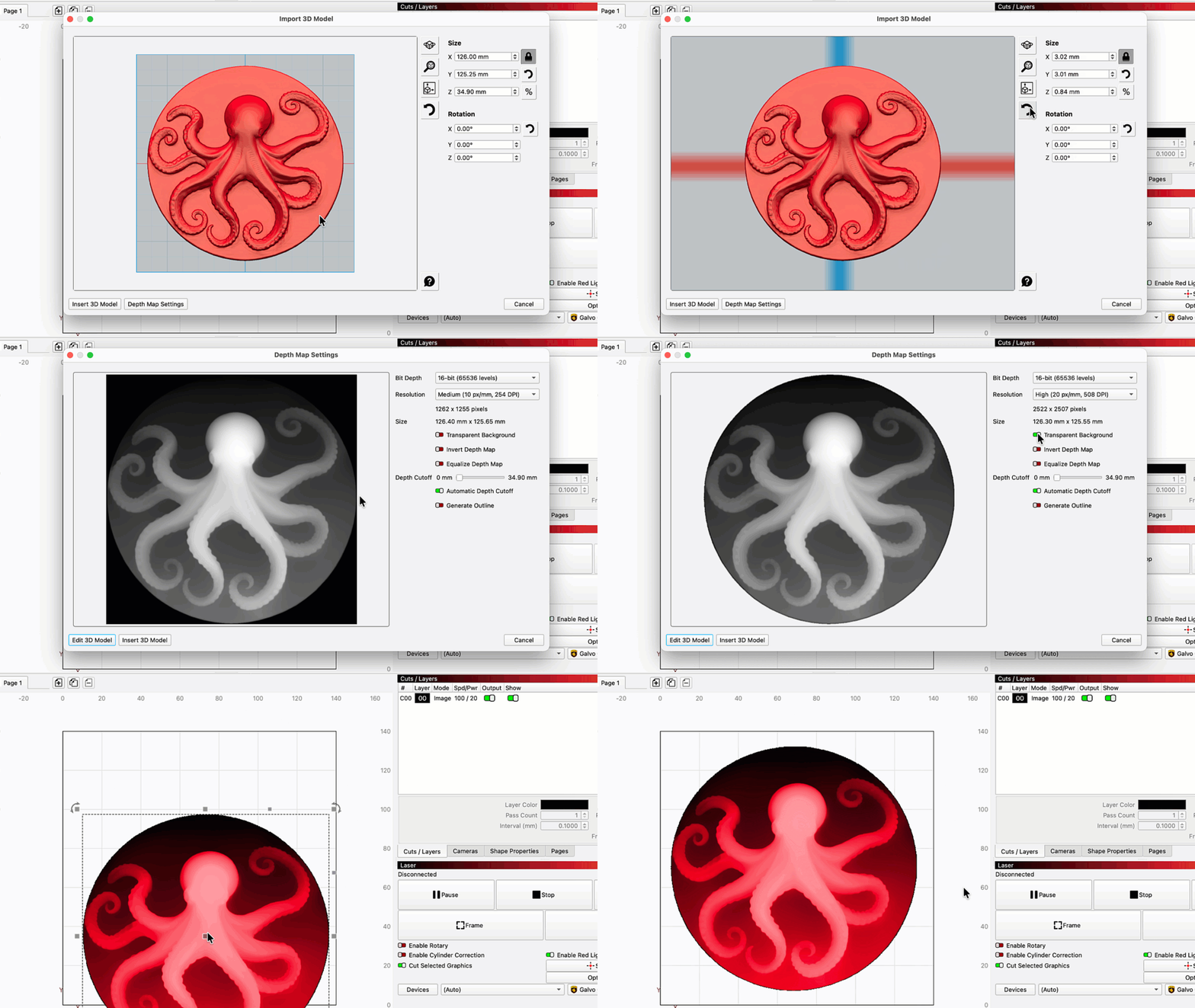
We've added a new way to source depth maps for your 3D engravings — you can now import 3D models in .stl, .3mf, .amf, .obj, .off, and .ply formats.
Adjust the model's Orientation, Scale, Bit Depth, Resolution, and other settings, then add it to your Workspace. It will appear in red while it remains an adjustable 3D model. Right-click and select Convert to Bitmap to make it a true grayscale image (note that you'll lose the ability to adjust the model's properties after converting).
REST API (Labs)
We've added a REST API to LightBurn, providing a way to communicate between LightBurn and other applications. The API is intended to allow users and developers to create integrations and improve interoperability with other software for advanced workflows, automated processes, status monitoring, and data exchange between LightBurn and third-party applications. The API is intended for use on a single computer or within your local network.
Public documentation for the LightBurn REST API is available now on GitHub.
More detailed documentation is coming soon.
As a reminder, LightBurn does not endorse, recommend, support, or encourage unattended use of lasers or other machinery. LightBurn's API is not a replacement for direct operator supervision.
User Tools
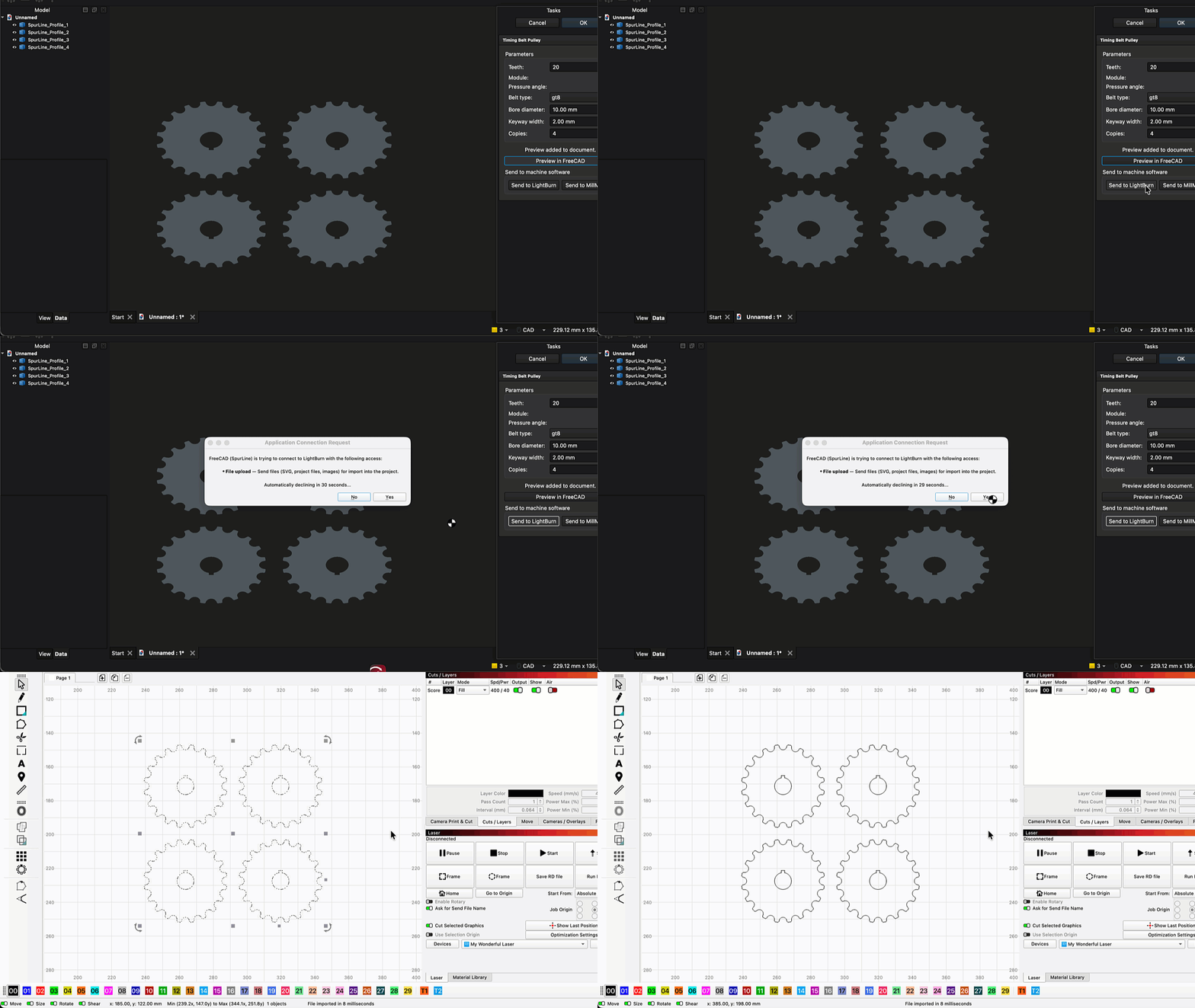
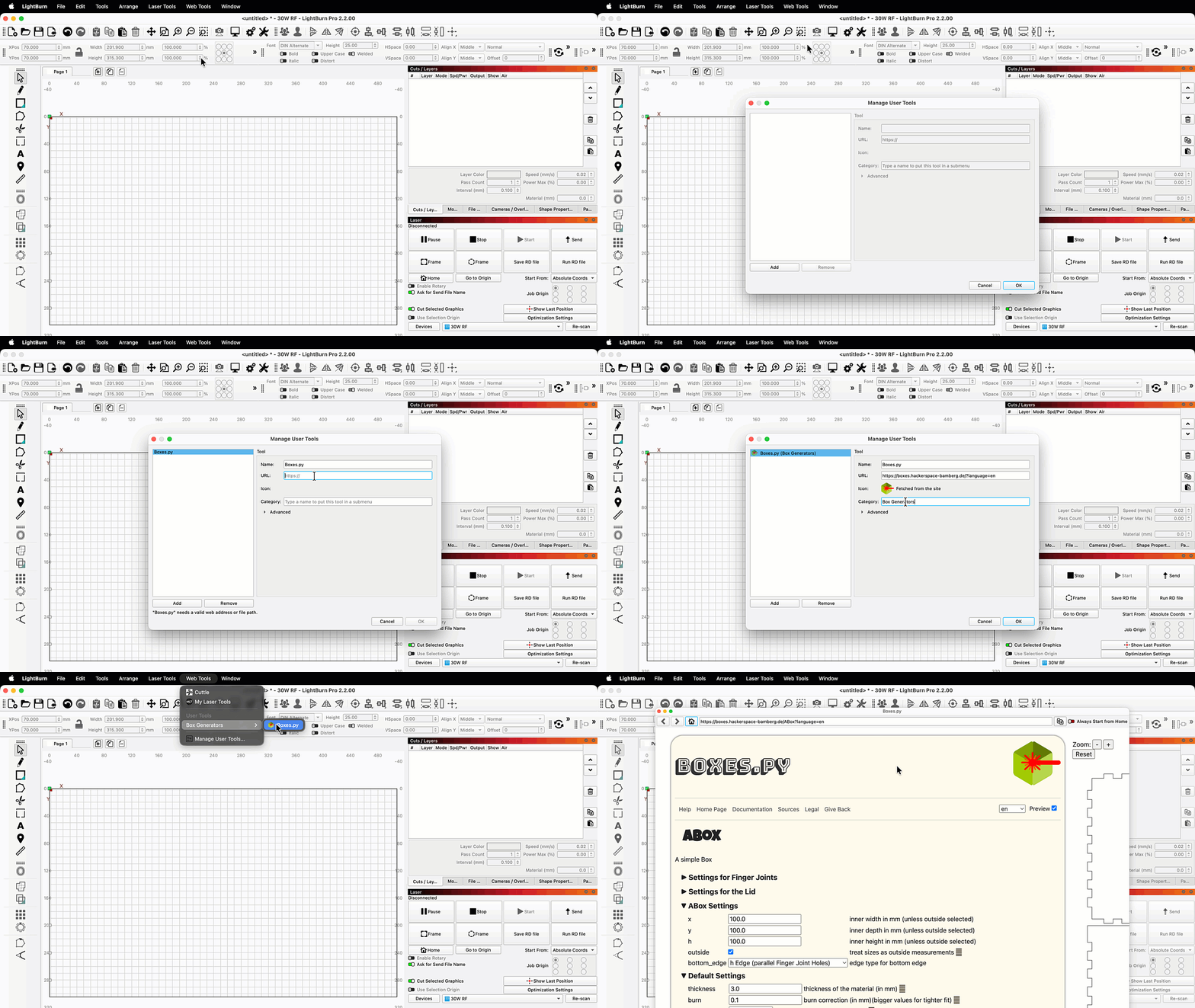
You can now add custom entries to the Web Tools Menu. Click Manage User Tools then Add, and enter a Name and URL. You can also specify a Category to keep things organized.
User Tools work the same as built-in Web Tools — use your chosen generator in the built-in browser, then send your result directly into LightBurn by using the download button.
ACCELaser Support
The first LightBurn-supported flying galvo lasers are here: the ACCELaser HD1 series.
The HD1 series introduces game-changing technology, combining both gantry and galvo motion systems into a single machine and leading to much faster processing times without sacrificing cutting ability or working area.
It features dual diode and fiber laser sources, so you can select the right option to mark or cut a range of materials, from wood, to slate, to metal.
For positioning, it offers a dual camera system — one global overhead camera, and another mounted to the laser head.
Finally, the HD1 series supports LiDAR ranging for curved surface and multi-height engraving.
We've worked closely with the ACCELaser team from the start to make sure we could provide full support for this exciting new technology.
Bambu R1 Support
We've added initial support for the new Bambu R1 CO2 laser. Our work on this is not yet done, and we're coordinating closely with Bambu to expand our support.
Here's where we're at: in 2.2, LightBurn has the ability to create and export G-code compatible with the R1. You'll need to use a special device configuration file provided by Bambu to do so.
In 2.3 (coming in the not-too-distant future), we're planning for more support: direct connection, all the R1's special features, and the complete start-to-finish LightBurn workflow.
Epilog Support (Labs)
We're thrilled to announce that we've added support for Epilog lasers in LightBurn 2.2.
Epilog has long been a leading manufacturer in the laser industry, with a reputation for quality, high-performance machines. We've worked closely with their team to implement LightBurn support for their full range of hardware.
Note that our support for Epilog lasers is a "Labs" feature in 2.2. That means we've tested to the point that we're confident it's ready for public use, but we also know it needs a little more testing before we call it 100% complete.
Please use with caution, and be sure to report any issues you encounter to us at [email protected].
Improved xTool Support (Labs)
Our support for xTool lasers has improved across the board in 2.2, with better support for all machines that previously worked with LightBurn, and added support for a handful of new machines.
There's so much to share that we'll have to express ourselves in bullet points:
- We've reworked and expanded our native xTool protocol to additional devices, resulting in a much more stable experience across all supported machines
- We've added WiFi/network support for F1, F2, and P2 series machines
- Multi-source jobs are now supported for the F1 and F1 Ultra
- We now support auto-focus for P2 and P2S lasers with IR rangefinders
Note that our support for additional xTool machines is also a "Labs" feature — a lot of these changes are hot off our devs' keyboards, and in need of a bit more testing. Please report any issues to [email protected] or on our forum.
My Laser Tools Integration
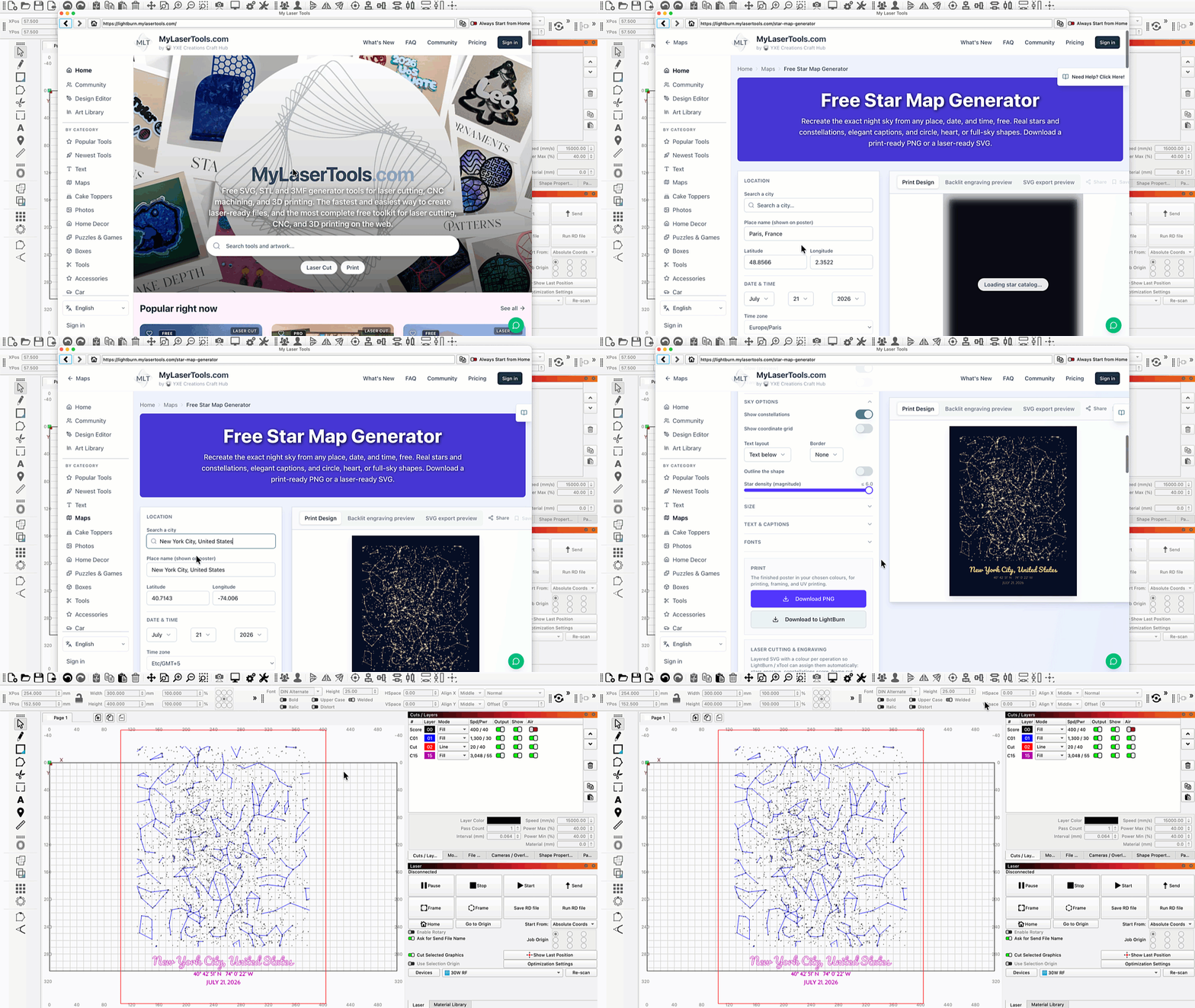
MyLaserTools.com is now available in our Web Tools Menu. My Laser Tools provides a set of design tools for laser cutting, engraving, and beyond. Most are free to use, ranging from connected text and boxes to keychains and signs, alongside art assets and a premium designer for creating custom map art.
As with previous integrations, My Laser Tools offers both free and paid tiers. As a reminder, this isn't a financial arrangement for us, and we don't take a cut of any subscription payments.
Our goal with all integrations is to help makers find useful tools and give visibility to the tool-makers who provide them. As the options grow, you'll find more overlap among our integrations — that's by design. We're committed to giving our users choices, and not locking anyone into a specific machine ecosystem or any single design platform we partner with.
ARM Builds for macOS
We now have macOS builds natively compatible with ARM-based CPUs (sometimes referred to as "Apple silicon" or "M series" chips).
That means you won't have to wait a minute or two for LightBurn to open on your Mac the first time you run 2.2!
Apple has announced that with the release of macOS 28 (anticipated fall 2027), they will no longer support apps that are not specifically built for ARM. Any user that has a Mac with an "M series" chip and updates to macOS 28 will be required to update to LightBurn 2.2.00 (or later). Previous versions of LightBurn will not run on macOS 28. This will also affect any user who purchases a new Mac after the release of macOS 28.
In-App Bug Reports
We thought you all might need a new way to tell us what we're doing wrong, so you can now submit bug reports directly through the software. Go to Help → Report a Bug... then fill out the form to let us know what happened. You can also choose to send a screenshot and additional data.
Please limit usage to bug reports only. If you have a feature request, click Submit Feature Request a little higher up in the same menu.
Other Notable Additions
- Find My Laser can now discover network connections to supported lasers, including Epilog, Creality, and xTool devices
- Duet/RRF HTTP flavor added to the Custom G-code Editor
- Custom hotkey support added to the Macros Window
Changelog
Click to Read our Full Changelog
New Features
- Added True Nest
- Center Line Trace.
- REST API for local and network inter-application communication.
- Target buffer override for G-code devices whose firmware doesn't report the buffer size or reports it wrong.
- 3D model import.
- Depth map creation from imported 3D models.
- Extra controls for Custom G-code devices, similar to GRBL.
- FluidNC flavor filtering to clear [MSG] spam from the Console.
- 3D model import added. Your Benchy finally has somewhere to go
- Creality Falcon HTTP flavor for Custom G-code.
- Duet/RRF HTTP flavor for Custom G-code.
- Accelaser hybrid gantry + galvo device support.
- LiDAR surface scanning with height-compensated engraving.
- Rotary setup on Emblaser Pro.
- Accelaser LiDAR ranging dialog improvements.
- REST API added. LightBurn itself still does not rest
- Default G-code file extensions for Custom G-code flavors.
- Revert to Manual Alignment button on the Overhead Auto Alignment page.
- WeCreat HTTP flavor for Custom G-code, for sending job files to WeCreat lasers.
- Device Classification (Model and Source) in Device Settings, allowing full offline design for adaptive protocols.
- TopWisdom rotary support.
- Galvo Move panel as a dockable widget.
- PCB file import (Gerber and drill files).
- Epilog laser support.
- Calibration Target Collector.
- xTool F1, F2, and P2 series support over network (F1, F1 Lite, F1 Ultra, F1 Ultra 2, F2, F2 Ultra, F2 Ultra Single, F2 Ultra UV, P2, P2S).
- Camera and Depth Overlay Registration dock widget.
- Report a Bug in the Help menu.
- REST POST endpoints and Project write capability for writing settings to a project.
- REST API reports and edits dual-source, galvo and MOPA laser settings.
- Split Marking on EzCad3 devices, tiling along one or two page axes as a grid while any other axis holds a fixed position.
- External Axis Setup on EzCad3 lists every configured axis with a tiling or fixed position role, and refuses two rows that drive the same motor.
- EzCad3 split marking starts tiling from the worktable origin set up in EzCad3, so the first tile lands under the galvo head instead of at the home switch.
- Table shear correction for split marking cancels the seam drift of a worktable whose rails are not square to the galvo field, imported from the EzCad3 configuration and editable in Split Marking Setup and the runner window.
- External Axes Settings tab in Device Settings for EzCad3, with one control group per axis covering motor selection, step scaling, speeds, homing, position readout, jog, Home and Stop, and on the rails a move to the worktable origin.
- xTool rotary support for D1, F1, F2, P2, S1 over network in Absolute and Current Position modes.
- Rotary Park Position to 'park' the head at a specific position before switching into rotary mode (initially for xTool).
- REST endpoints to fetch the existing camera overlay image and its metadata (see https://github.com/LightBurnSoftware/LightBurn-REST/pull/2 for API changes).
- REST API changes for galvo vs gantry cut settings endpoints; clients must update, see https://github.com/LightBurnSoftware/LightBurn-REST/pull/3.
- xTool cloud credential updates to support new firmware.
- xTool and Creality Falcon network devices now appear in Find My Laser - Search Network.
- Galvo Move window and Z axis settings for BSL galvo lasers, with configurable homing that stops the axis.
- Print and Cut using a head-mounted camera.
- xTool workspace size read during network device connection.
- LBP 0.8 Labs Integration.
- Custom web tool support.
- BSL door protect support.
- Print and Cut with a head-mounted camera. The camera is mounted on the laser head, not yours
- Extensions tab on the galvo settings page.
- Vector troubleshooter.
Bug Fixes
- Typos in Quick Nest messages.
- Some Custom G-code values were unit-converted when they shouldn't have been.
- Launching and immediately closing could crash the web tool loader.
- The on-screen keyboard didn't appear when touching a number field on a tablet (Windows only).
- The 3D import dialog viewport didn't render.
- Min tabs was not always respected.
- Equations in number entry fields were parsed wrongly when using a comma vs a period.
- The dogbone tool could fail in some cases; it now uses double-precision math.
- Text could change position after copy and paste because its new width wasn't handled.
- The edit window rebuilt its render buffer constantly, including on every repaint.
- The trim tool didn't work in some cases.
- Select all shapes for an operation accidentally included shapes from other pages.
- Toggle Panel visibility didn't toggle the Pages panel.
- 3D depth maps weren't imported with an image cut setting.
- Memory leak in the cut settings editor.
- The Device Settings dialog cut off Custom G-code options.
- Framing could use the wrong origin offset.
- Custom G-code didn't use the custom header when framing.
- Reset to Default Layout didn't work.
- Network permissions were missing on macOS 27.
- Re-exported images were sometimes rotated 180 degrees.
- The Device Settings dialog could cut off or squash widgets; its minimum size and stretch policy are now set correctly.
- Newer Qt was no longer resolving host names in some cases.
- Opening a LightBurn or MillMage file from the other app showed an incorrect warning and didn't preserve pages the way importing does.
- SVG import was missing content from files using SVG 2.0 features and sized text wrongly; skew and SVG 2.0 / CSS unit types (%, em, ex, ch, q...) are now supported.
- LightBurn no longer Panic(s) at the Disco
- Number entry fields could change value randomly.
- Pause/resume sent two pause commands while streaming G-code.
- Shape Properties panel fields didn't support flexible number input, unit conversion, and formulas.
- The position readout didn't refresh after a discrete jog or work-offset change.
- 3D model rotation was wrong after switching between mouse rotation and the rotation fields.
- Tab order of controls in the 3D import dialog was wrong.
- Connection buffers could block in rare circumstances on flaky grblHAL controllers.
- PDF files with object entries split across lines weren't handled.
- PWM frequency raised to 4000 kHz. Dogs within a three-mile radius have been notified
- Print and Cut label icons didn't follow the theme colors.
- Some checkable menu options didn't show check mark icons.
- Thunder Titan controllers now get separate laser enable flags.
- The PWM frequency limit is raised to 4000 kHz.
- Units typed in upper case (MM or IN) didn't convert.
- Preview could crash after importing or opening a MillMage file.
- EzCad3 fiber marking was slow when Always Open MO was disabled. Every jump closed and reopened the master oscillator and waited the Open MO Delay, which added several milliseconds per jump. The oscillator is now opened once per job regardless of the Always Open MO setting.
- EzCad3 devices created with Find My Laser were saved with gantry simulation parameters. The protocol now supplies galvo defaults, and the Read Sim Params button is available for EzCad3 devices.
- Shape Alt-drag didn't snap properly to vertical positions.
- Sparrow and jagua-rs license details were missing.
- The REST API status didn't report job progress correctly.
- The 'Enable Laser 2 Controls' checkbox didn't look disabled when it was disabled.
- Swap X/Y Axes had no effect on Custom G-code devices.
- Z axis homing settings in Device Settings misbehaved: Enable Homing was bound to the limit switch flag instead of the homing flag, turning homing on or off didn't take effect until the dialog was reopened, and the homing direction, homing switch level, limit switch level and jog direction radio buttons could show neither option selected.
- Stepper speed and homing timeout spin boxes in Device Settings and External Axis Setup clamped imported values, silently halving a fast Z axis and capping its homing timeout.
- Framing or sending a design with split marking enabled from the main window no longer reports "No shapes in bounds".
- The frame preview for a split marking or rotary job moved the external axis using the page axis number instead of the motor port.
- EzCad3 external axis commands enabled the controller limit switch mode whenever homing was enabled, so an axis with homing but no limit switches homed away from its switch and ignored the Homing Direction setting.
- EzCad3 external axis homing used a fixed 30 second timeout instead of the go-home timeout imported from Motors.ini, aborting slow homing moves partway through.
- The steps distance of a split marking or rotary axis was not saved on EzCad3 devices and reverted to one unit each time the dialog was reopened.
- Closing or switching away from an EzCad3 device while an external axis was moving or homing blocked for up to the move timeout before the connection shut down.
- Connecting to an EzCad3 machine with Find My Laser and no config files froze.
- EzCad3 galvos didn't return to the red dot rest position after a job was stopped, skipped the rest position jump when the cached position already matched, and went to field center instead of the configured rest position at the end of a job.
- Frequency control was missing for EzCad3 devices.
- Camera overlay was never updated for negative-W alignment matrices.
- UI font scaling could enlarge the UI on low-resolution screens and crop some UI elements.
- Invalid environment variables carried over from older LightBurn versions could cause UI scaling issues.
- The Galvo Move window appeared on gantry, JCZ and BSL devices, and once shown was remembered for that device. Each Move window now decides from the device profile whether it applies, the galvo one defaults to hidden and refuses to show elsewhere, and profiles that had stored it as visible correct themselves.
- The Jog Laser Down hotkey did nothing due to a typo.
- Preview frame rate issue in the new auto camera calibration wizard.
- Editing Machine Settings could crash when the device returned errors.
- Deleting a page or undoing a page delete didn't update the list of active layers.
- 16-bit greyscale and ARGB32 images couldn't be adjusted in the image adjust dialog.
- Epilog engrave speeds just under 1% showed ?? on the machine display and ran too fast.
- Epilog CO2 fill and image layers ignored the power setting and engraved at full power.
- Docked panels overlapped and clipped their contents at large font and icon sizes.
- MOPA QPulse and Frequency support were confusing for Thunder devices; those settings are now consolidated.
- Custom G-code didn't output rotary settings in headers.
- Changing the active page refreshed twice.
- Galvo Rotary Marking and Split Marking advanced the serial number when no job was completed.
- REST API jog settings could not be changed, and invalid jog, home and override values were silently accepted.
- REST API cut settings repeated the base layer in the sub-layer list and left out sub-layer settings.
- Overcut cut short and ended off the outline on curves.
- Camera UI and thread safety improvements.
- The start point editor could show the arrow in the wrong direction on closed shapes.
- Camera settings didn't persist in preferences.
- Epilog device settings didn't match the actual device capabilities; they're now locked to match.
- Camera auto modes overrode saved manual settings.
- Depth maps from imported 3D models were invisible when the view mode was set to filled.
- Depth maps lost their image type when moved to a new layer.
- REST API omitted the first sub-layer's name and wrongly reported the Show checkbox status.
- The Window menu's Move entry showed unchecked when the Move window was docked behind another tab, and could be selected on galvo devices without a Move window, where nothing appeared.
- EzCad3 Repeat Marking only turned the rotary a fraction of a degree per step when the axis type was set to Rotating.
- Titan controllers showed a current position option they don't support.
- Camera buttons were missing from the Camera / Overlays widget.
- SVG export wrote varying line weights and incorrect line attributes.
- UI issues in connection request dialogs.
- Under certain conditions the calculation of required resolution for current font and icon size settings was incorrect, and could prompt users to change display settings when unnecessary.
- With "Require framing before start" enabled, the Start Marking foot pedal on BSL lasers started marking immediately instead of opening the framing window first.
- The external Stop Marking input on BSL lasers did not stop jobs started from the main window.
- On EzCad3 lasers, Run Continuously and Repeat in the framing window counted jobs rapidly while only marking occasionally.
- BSL split marking settings weren't saved.
- Epilog speed limits weren't clamped in the Cuts / Layers window.
- Rows in Cuts / Layers didn't resize when their height changed after linking to the material library.
Existing Feature Updates
- Number entry fields accept a comma or dot as the decimal separator, ignore earlier commas and dots, and show a thin space as the thousands separator.
- Settings show 'Cmd/Ctrl-Arrow:' instead of 'Ctrl-Arrow:' to indicate the Mac Command key.
- Path and unusual characters are filtered out of the document title in exported AI files.
- Latest Visual C++ Redistributable, with the unneeded version removed from the installer.
- Break apart and Auto-join now preserve tabs.
- Custom shortcut keys for user-defined macros.
- App version number saved in preferences.
- Split marking for BSL galvos.
- Double-click in node edit converts to a path.
- Warning when importing a galvo or DSP device with a Core license.
- Selected items and progress bars keep part of their original blue color instead of turning white in the light theme and black in the dark theme.
- The New Device Wizard notes that comms settings only need editing when resolving problems.
- Consistent "G-code" in messages and the UI, and "Error:" capitalized in the Console.
- Warning to remove the probe and wires before starting a job after the probe wizard has been run.
- New "Not Responding" comm status, so error messages distinguish between disconnected and not responding.
- Clearer License dialog with links to help pages.
- Faster bitmap loads for large projects.
- ESC key closes the measure tool.
- Guide lines excluded from thumbnail bounds.
- Ruida UDP file retransmit support.
- Better multi-mesh support for 3D import and depth map conversion.
- New Device Wizard and Device Settings include Z axis height setup for galvo controllers.
- Single Accelaser device with a model selection page.
- Jog widget and camera layout fixes.
- Separate EzCad2 and EzCad3 drivers.
- Galvo Z control is back, and it beat Avengers: Doomsday to release
- Windows ARM EzCad drivers included.
- AI Escape rate decreased 42%
- Updated FTDI drivers and libraries, including the Windows ARM driver.
- Auto calibration pattern collection procedure upgrades.
- Accelaser planner library update and increased wobble precision.
- Variable axis letter names for controllers that support them.
- Frame preview positions every configured axis and shows grid tiles where they will actually be marked.
- The laser status shows Moving while external axes reposition during a galvo job, and Stop during a split marking axis move takes effect immediately.
- Split marking elapsed time includes the homing before a job and the return to the start position after it.
- The Galvo Move window keeps its Z position across a Stop that did not interrupt a move, and no longer waits on a Home request the axis could not accept.
- Split Marking Setup shows the fixed position target for the Z axis in the same Home is Zero convention as the Move window.
- The EzCad3 Z jog stays within the configured Z axis height once the axis is homed.
- Registration / Camera widget layout updates.
- Alignment intro page removed.
- Accelaser planner library loads on demand instead of at startup.
- The Alignment Wizard sets the cut origin to Absolute and restores the previous setting on exit.
- Focus on the calibrate button in the New Camera Wizard.
- Improved camera dialog tooltips.
- Device Settings and External Axis Setup refuse to close on an unusable axis value, such as a minimum speed above the maximum, instead of silently clamping it.
- A new split marking axis row on EzCad3 starts from the imported steps, distance, homing speed and timeout of the chosen motor.
- Preset cameras now also go through all setup steps.
- Alignment Wizard verification update.
- Warning when the wrong AprilTags are detected.
- Option to fill alignment pattern features.
- Cameras and Registration docks merged into one.
- Accelaser camera presets.
- Focus Test and Interval Test are no longer shown for Accelaser devices.
- Unsent crash reports can be deleted.
- Entering a Z axis height in the New Device Wizard turns on Z axis control.
- The Galvo Move window only appears when Z axis control is enabled for the device.
- Camera Calibration QR code points at the docs.
- Accelaser REST API features for framing and LiDAR scan cancelling.
- Rotate view buttons in camera calibration.
- Snap dragging can take X from one shape and Y from another.
Miscellaneous
- Pro mode trial with a valid Core license.
- Valid URLs can be pasted into the Web Tool browser.
- 3D Modelling temporarily stuck in the 8th Dimension. A Buckaroo Banzai has been dispatched to retrieve it.
- Legal warning that must be accepted before SVGNest can be used.
User Interface Updates
- Improved visibility of toolbar drag handles and overflow arrows.
- Padding between items in the main toolbar.
- Buttons in the 3D import and depth map settings dialog show more clearly when they have focus.
- Split marking menu text and window titles no longer say one axis or single axis.
- Application font size setting now applies to tooltip text.
- The steps pair is labelled Steps and Distance in Device Settings and External Axis Setup, matching the imported values.
- Cut settings dialog now includes Epilog-specific settings and device limits.
- mDNS search for Epilog devices in the device discovery dialog.
- Minimum screen size check tables updated to account for UI updates and fixes when High DPI Scaling is disabled.
- New startup check and prompt to enable the "High DPI Scaling" setting if a high DPI display is connected.
- Title case is consistent across all right-click menu entries.
- Smoother expand animations in the Camera / Overlays widget.
- 'Paste in Place' in the right-click menu.